Why is my website not ranking on Google?
Before anyone sells you keywords, backlinks or a content plan, there is a free ten-minute check that tells you whether ranking is even the problem you have. Most sites that are "not ranking" are stuck one or two gates earlier, and none of the usual SEO work touches that.
Quick answer: a page has to be crawled, then indexed, then ranked, in that order. Open the Page indexing report in Google Search Console and find out which gate your pages stopped at. If they are not indexed, no amount of content, keywords or links will help until that is fixed. If they are indexed and still invisible, the problem is relevance and authority, and that is the only stage where ordinary SEO work applies.
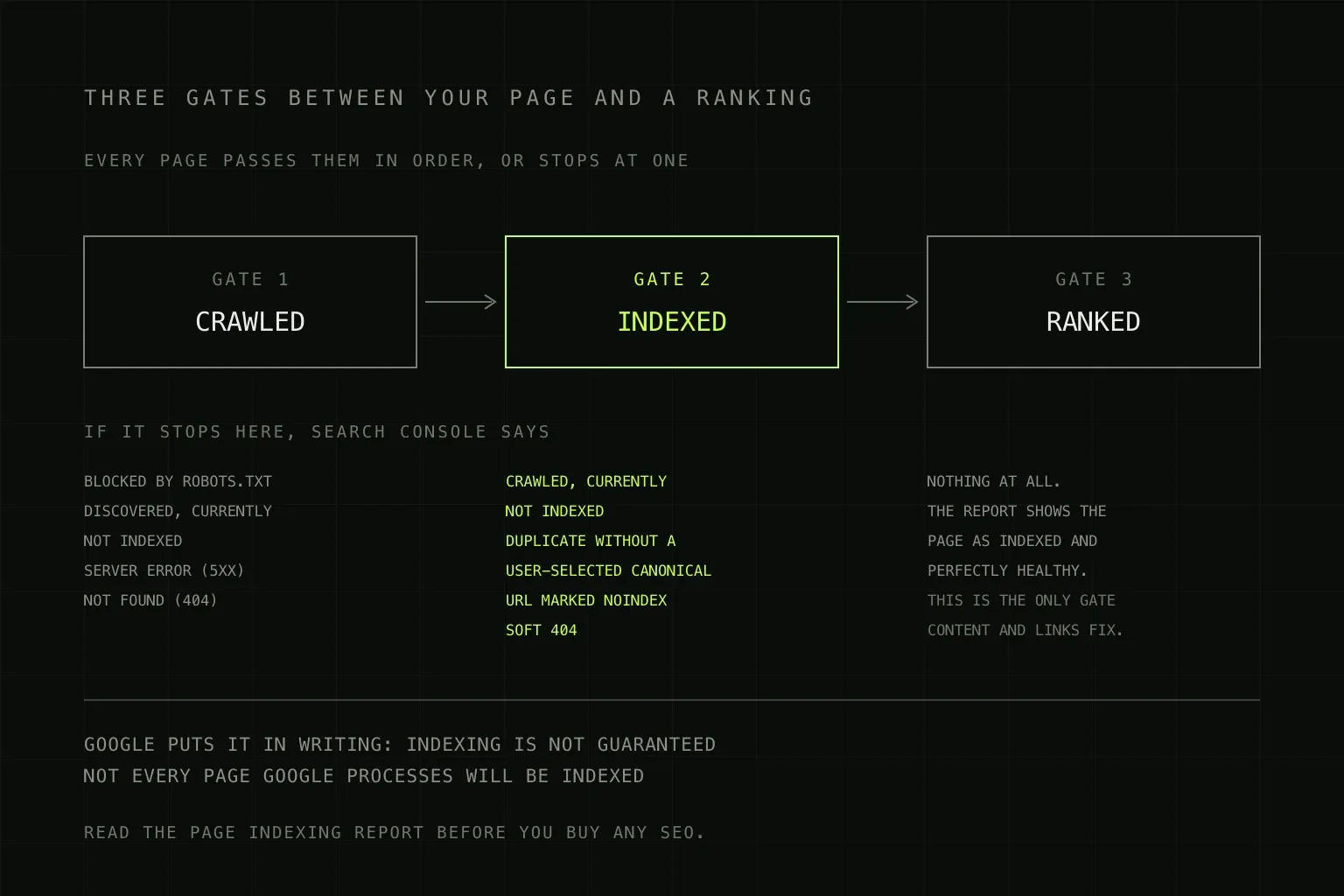
Search Console tells you which gate stopped the page. Gate 3 is the only silent one.
Google's process has three stages, and most advice only addresses the third
Google documents its own pipeline in three parts: crawling, indexing and serving search results. They happen in that order and a page cannot skip one. The reason this matters commercially is that almost everything sold as SEO, meaning keyword research, content, on-page optimisation and link building, only affects the third stage. If your pages are failing at stage one or two, you can buy a great deal of stage-three work and see nothing change.
Google is unusually direct about this in its own documentation: indexing is not guaranteed, and not every page it processes will be indexed. That single sentence contradicts a lot of what agencies imply when they take on a new site.
Gate 1: has Google crawled it?
Crawling is Googlebot fetching the page. Failures here are usually technical, blunt and quick to fix.
- Blocked by robots.txt. Most often a staging rule that shipped to production. It happens more than anyone admits.
- Server errors (5xx). If Google gets errors repeatedly, it backs off and crawls less.
- Not found (404). Usually a migration that changed URLs without redirects.
- Discovered, currently not indexed. Google knows the URL exists but has not got round to fetching it. On small sites this often means the server is slow. On large ones it means you have generated far more URLs than the site is worth crawling, typically through filter and sort parameters.
Use the URL Inspection tool on a page you care about. It tells you what Google actually retrieved, when, and whether anything blocked it. That is a direct answer, not an inference.
Gate 2: has Google indexed it?
This is where most stuck sites are actually stuck, and it is the least understood stage because the failures are not errors. Google fetched the page, considered it, and decided not to store it. The Page indexing report names the reason.
| Search Console status | What it means | What actually fixes it |
|---|---|---|
| Crawled, currently not indexed | Fetched and judged not worth indexing | Make the page substantially better or more distinct, or accept it will not be indexed |
| Duplicate without user-selected canonical | Google found near-identical pages and picked one, and it was not the one you wanted | Declare canonicals, or consolidate the pages into one |
| URL marked 'noindex' | You told Google not to index it | Remove the tag or header. Check your CMS defaults and any SEO plugin |
| Soft 404 | Page returns 200 but looks empty or like an error to Google | Either give it real content or return a proper 404 |
| Alternate page with proper canonical tag | Working as intended: this page points at another one | Nothing, unless the canonical target is wrong |
The one people fight hardest is Crawled, currently not indexed, because it feels like a bug. It is not. It is a verdict. Requesting indexing again on an unchanged page mostly wastes an afternoon. If a page needs to be indexed, it has to earn it by being genuinely different from what is already indexed, including from your own other pages.
Gate 3: indexed and still nowhere
This is the only gate that reports nothing. Search Console shows the page as indexed and healthy, and it still does not appear for anything you would care about. There are three usual explanations, and they are worth separating because they cost very different amounts to fix.
- The page does not match the query. A services page written about your company, when the query is a question about a problem. The page is fine, it just answers something nobody typed.
- Everything ranking above you is better resourced. On competitive commercial terms, page one is often directories, marketplaces and national brands. A small site can beat them on specific and local queries and will struggle on generic ones for a long time.
- The domain has no authority yet. Content quality gets you into the contest. Other sites referencing you is a large part of what decides it. This is the slowest and least controllable part, and it is the part that cannot be shortcut with more pages.
The practical move at gate 3 is to stop competing on the hardest terms first. Ranking for a narrow query that thirty people a month search, and that converts, is worth more than position 70 for a query that five thousand people search.
The ten-minute check, in order
- Search
site:yourdomain.comon Google. If almost nothing comes back, you have an indexing problem, not a ranking one. - Open Search Console, Page indexing. Compare indexed against not indexed and read the reasons listed.
- Run URL Inspection on your three most commercially important pages. Confirm each is indexed and that the canonical Google chose is the URL you expected.
- Open the Performance report, filter to the last three months, and look at queries and average position. If you have impressions but no clicks, you are ranking too low to be seen, which is a gate-3 problem. If you have no impressions at all, go back to step 2.
- Search for your business name. If you do not appear, you have something serious at gate 1 or 2.
Every step there is free and takes minutes. It is worth doing before any conversation about budget, because it changes what you should be buying.
What this rules out
A few things get blamed for poor rankings far more often than they deserve.
- Meta keywords. Google has not used them for many years. If a proposal mentions them, that proposal was written from a very old template.
- Site speed, as the primary cause. A genuine but modest signal. It does not stop a page ranking, it shades where a page lands. Worth fixing on its own merits, covered in why is my website slow.
- Publishing volume. Publishing more thin pages is the fastest way to accumulate "Crawled, currently not indexed" and to make the whole site look weaker.
- Special files and markup for AI search. A separate topic with its own myths, covered in AI search optimisation.
When ranking is not actually the problem
Worth naming, because it is common. If Search Console shows solid impressions and clicks and the phone still is not ringing, ranking is working and the site is not converting the traffic it already has. That is a different diagnosis with a different fix, and it is usually a cheaper one. Why is my website not converting works through it.
Where we sit
We start every SEO engagement at the Page indexing report rather than at a keyword list, because on roughly half the sites we look at the first month of work is technical rather than editorial, and it is not what the client expected to be buying. We would rather tell you that before you commit than three months in.
SEO is monthly and scoped to what your site actually needs, and we will tell you plainly if the honest answer is that your domain needs a year rather than a quarter. Detail on the SEO service page, and SEO costs in the UK covers what the market charges and what the retainers include.
Frequently asked questions
How long does it take for a new website to rank on Google?
Indexing can happen in days. Ranking for anything competitive usually takes months, and for a new domain in a crowded market it can take a year or more. Google does not publish a timeline, and anyone who gives you one confidently is guessing. The useful early milestone is not a ranking, it is confirmation in Search Console that your important pages are indexed at all, because nothing can happen before that.
What does 'Crawled - currently not indexed' mean?
Google fetched the page, looked at it, and chose not to add it to the index. It is not an error and there is nothing broken to repair. It is a quality and value judgement, most often on thin pages, near-duplicate pages, or pages that repeat what is already indexed elsewhere. Google states plainly that indexing is not guaranteed and that not every page it processes will be indexed. Resubmitting the same page rarely changes the answer; changing the page sometimes does.
What is the difference between 'Discovered' and 'Crawled - currently not indexed'?
Discovered means Google knows the URL exists but has not fetched it yet, often because it is managing crawl load on your site. Crawled means it did fetch it and declined to index it. Discovered points at site-level issues like server speed or an enormous number of low-value URLs. Crawled points at that specific page's content.
Do I need to submit my site to Google?
No. Google finds sites by following links, and a sitemap helps it find your pages faster. Submitting a sitemap in Search Console is worth doing once and takes two minutes. Paid submission services, and anything offering to submit your site to hundreds of search engines, sell you something that does nothing.
Why does my site rank for my business name but nothing else?
Because your name is a query with almost no competition and no ambiguity. Ranking for it proves you are indexed and nothing more. Ranking for what people search when they do not know you yet is a completely different contest, decided by content that matches the query and by other sites linking to you. Treat brand-name ranking as a health check, not as progress.
Is my website not ranking because it is slow?
Rarely as the main cause. Core Web Vitals are a genuine ranking signal but a modest one, and they mostly act as a tiebreaker between pages that are otherwise comparable. If your pages are not ranking at all, speed is almost never the reason. If they are ranking on page two and you are looking for an edge, it can be part of the answer.
Related guides: SEO costs in the UK covers what the work costs, AI search optimisation covers being cited by ChatGPT, Claude and AI Overviews, and how to choose a web design agency covers the questions worth asking before you sign anything.