The best website builder for a small business
Almost every "best website builder" article you will find is an affiliate page, and the rankings follow the commission. We are a web design agency, so we have the opposite bias and we will name it: we would rather you hired someone. Here is the honest version anyway, including the cases where building it yourself is genuinely the right call.
Quick answer: Squarespace for most UK small businesses building their own brochure site, because it is the hardest to make look bad. Wix if you want more control and built-in features like bookings. Shopify if you sell physical products, rather than bolting a shop onto a general builder. WordPress only if you have someone technical. Budget roughly £12 to £40 a month, and treat "free" plans as trials rather than options.
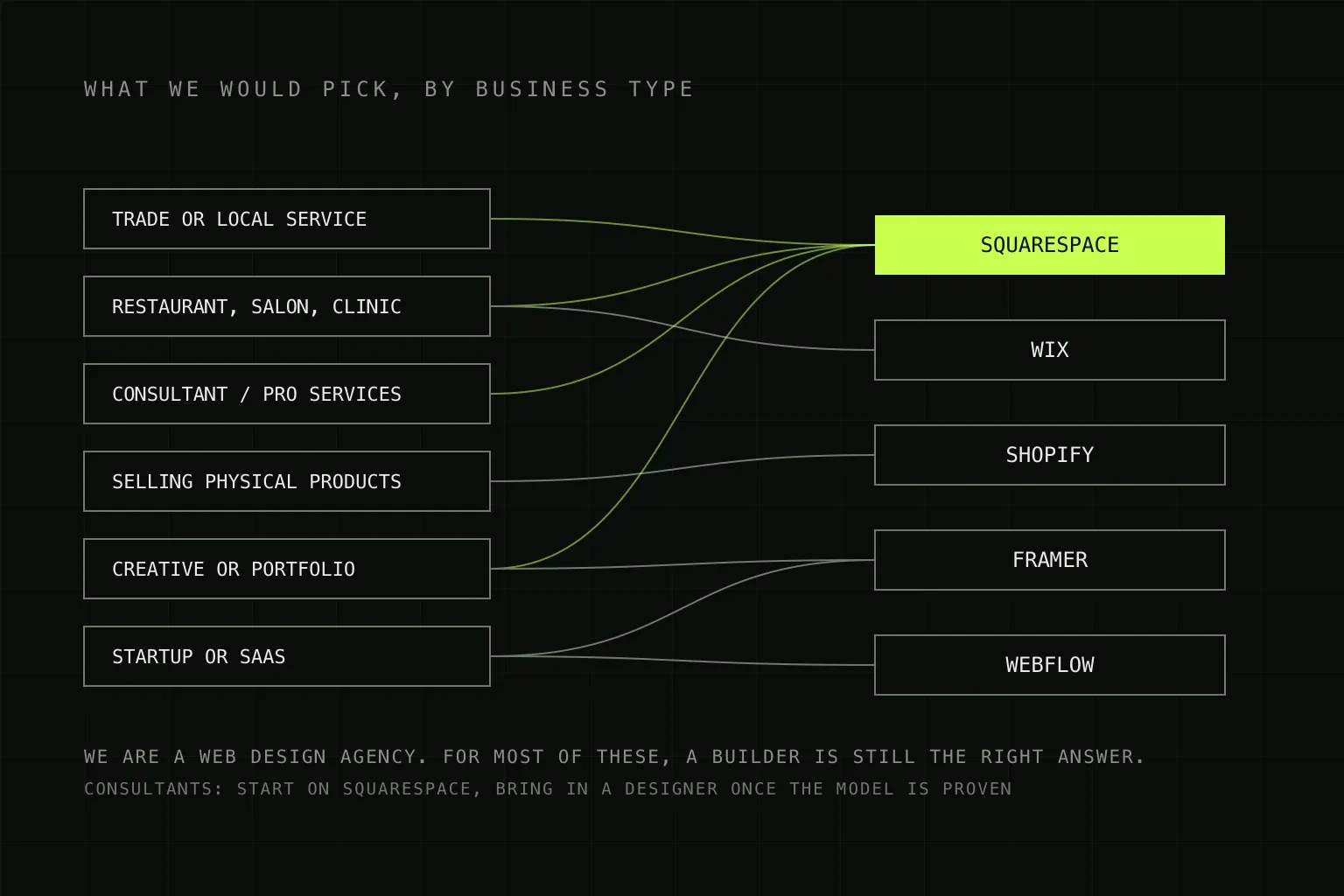
Six businesses, five builders. One of them answers most of the cases.
First, the question behind the question
Searching for a website builder assumes you are building it yourself. That is a real decision with a real price, and it is not the subscription.
A small business owner building their own five-page site on a builder typically spends twenty to forty hours on it, spread over a month or two of evenings. Not on the technical part, which the builder handles, but on the parts a builder cannot do for you: deciding what the site should say, writing it, sourcing images, and making the seventy small layout decisions that separate a site that looks considered from one that looks like a template with your logo on it.
If those hours are cheap for you, a builder is excellent value. If your time is billable and scarce, £12 a month plus forty hours is not the bargain it appears to be. That is the actual comparison, and it is worth doing honestly before reading any further.
The options compared
Prices below were checked in August 2026 and are for UK customers. Builder pricing changes frequently and every one of these companies runs promotions, so confirm the current number before you commit to an annual plan.
| Platform | Rough UK cost | Best for | The catch |
|---|---|---|---|
| Squarespace | Roughly £12 to £35 a month, cheaper billed annually | Service businesses, consultants, restaurants, portfolios. Anyone who wants it to look good without being a designer. | Less flexible than Wix by design. Commerce plans carry a transaction fee on top of card fees unless you are on a higher tier. |
| Wix | Roughly £10 to £40 a month across the Light, Core, Business and Business Elite tiers | Businesses wanting bookings, memberships or specific layouts. The largest app ecosystem of the mainstream builders. | Freedom to place anything anywhere means freedom to produce a mess, especially on mobile. Payments require Core or above. |
| Shopify | £25 a month billed monthly, £19 billed annually on Basic. Grow is £65 or £49. | Anyone selling physical products. Not a general website builder, and better for it. | Transaction fees. Basic is 2% plus 25p on standard online card rates, and using a third-party payment gateway instead of Shopify Payments adds a further 2% on Basic. |
| WordPress.com | Roughly £4 to £40 a month by tier | Content-heavy sites and blogs where you want WordPress without hosting it. | Plugins and real customisation need the higher tiers, at which point the price advantage over a proper builder disappears. |
| WordPress.org | Software free, hosting £5 to £30 a month, plus maintenance | Sites with unusual requirements, or businesses with someone technical in-house. | You own the updates, security and plugin conflicts. Usually the most expensive option over three years once time is counted. |
| Webflow | Roughly £12 to £30 a month per site | Businesses hiring a designer. Excellent output, genuine design control, very little to maintain. | A real learning curve. It is a professional tool with a builder-shaped price, not a beginner tool. |
What "free" actually means
"Free website builder for small business" is one of the most searched versions of this question, and it covers three completely different things.
- A free trial. Fourteen days or so of the full product. Genuinely useful. Build a real page in two builders before you pay for either, because the feel of them differs more than the feature lists suggest.
- A free-forever tier. Your site lives on a subdomain like yourbusiness.wixsite.com and carries the provider's branding. Wix makes this unusually clear: removing Wix branding is what every paid tier starts with. For a business, the subdomain is the bigger problem of the two, because it undermines the credibility the site exists to build.
- Free software. WordPress.org itself costs nothing. Hosting, a domain, a premium theme, and the plugins that make it do anything all cost money, and so does the time. Free software is not a free website.
The honest position: there is no free option that is appropriate for a business trading with customers. There is a very cheap one, which is an annual plan on a mainstream builder with your own domain, and that is where the search should end.
The four things that actually decide it
Feature comparison tables are mostly noise, because every builder does the basics. These four differ in ways that matter later.
- Transaction fees, if you sell anything. This is the number that dwarfs the subscription. On Shopify Basic, standard online card processing is 2% plus 25p, and if you use a third-party gateway rather than Shopify Payments there is an additional 2% on that plan, falling to 1% on Grow and 0.6% on Advanced. Squarespace charges a transaction fee on lower commerce tiers that disappears higher up. At £5,000 a month in sales, a 2% difference is £1,200 a year, which reorders every price comparison you have made.
- Whether you can leave. None of these let you export a working site. You can usually export blog posts and product data. You cannot export the design. Moving platforms means rebuilding, so the question is not "can I export" but "how much would I lose". Register your domain independently so that at least the address survives.
- SEO control. All the mainstream builders now handle the basics competently: editable titles and descriptions, clean URLs, automatic sitemaps, and reasonable page speed. The differences that remain are at the margins. Do not choose a builder on SEO claims. Choose it on whether you will actually publish content on it, which matters far more.
- The ceiling. Every builder has a point where the next thing you want is not possible. Ask what you might need in two years, particularly around integrations with the other software your business runs on. Hitting the ceiling is not a disaster, but discovering it a week before a launch is.
What we would pick, by business type
| If you are | Use | Because |
|---|---|---|
| A trade or local service business | Squarespace | You need five good pages, a phone number that works on mobile, and to never think about it again. Your marketing happens on Google Business Profile, not the site. |
| A restaurant, salon or clinic | Wix or Squarespace | Bookings are the whole job. Pick whichever integrates cleanly with the booking system you already use, rather than switching systems to suit the website. |
| A consultant or professional services firm | Squarespace, then a designer | Start cheap and prove the model. Credibility matters in this category, so this is the one most likely to justify hiring properly once revenue exists. |
| Selling physical products | Shopify | The general builders can sell things. Shopify is built for it, and the operational tooling around orders and stock is where the difference shows. |
| A creative or portfolio business | Squarespace or Framer | Both make image-led work look good with little effort. Framer is the more current-looking of the two if you enjoy fiddling. |
| A startup or SaaS | Webflow or Framer | You will iterate the marketing site constantly and want a designer able to ship without a developer. See is Webflow good for SaaS. |
When a builder is the wrong answer
Being the agency in this conversation, we should be specific rather than self-serving. These are the actual signals, and if none of them apply, build it yourself.
- The website is the business. A marketplace, a booking platform, anything with accounts and logic. A builder is a brochure tool.
- It has to talk to your other systems. A CRM, a stock system, an accounting package, a proprietary database. Builders integrate with the popular things and nothing else.
- You have tried and stalled. If the half-finished site has been sitting there for four months, the constraint is not the tool. Twenty hours you never find is more expensive than a build.
- You are competing on credibility. In categories where clients are comparing three firms and choosing on impression, the gap between a good template and considered design is a real commercial difference.
- You need it to rank in a competitive market. Not because builders are bad at SEO, but because competitive rankings need content strategy and ongoing work, which is a service rather than a platform choice.
The mistakes that cost people most
- Buying the domain through the builder. Register it separately, in your own business name, at a registrar you control. It costs the same and it means leaving is always possible.
- Choosing the template on looks alone. Templates are photographed with professional imagery and paragraphs of ideal length. Pick one that matches the content you actually have, not the content in the demo.
- Never checking it on a phone. Most of your visitors will be on one. Most builders preview desktop by default. Check every page on your own phone before launch and again after every edit.
- Paying annually before testing. The discount is real but so is the lock-in. Take a month at the monthly rate, build a real page, then commit.
- Treating launch as the finish. A site nobody updates decays. The builder is the easy part, and the content is the ongoing job.
Where we sit
We build custom sites, fixed price from £2,500, and we regularly tell enquirers that a builder is the right answer for where their business is now. That is not modesty, it is that a £2,500 site sold to someone who needed a £200 site produces an unhappy client and a bad case study.
The point where hiring starts to pay is usually when the site has to generate enquiries rather than merely exist, or when it has to connect to the rest of how you operate. Until then, spend £15 a month and put the difference into being findable.
If you want the full picture: what a website costs in the UK covers every tier including the professional end, which platform should you use goes deeper on the technical trade-offs, and website maintenance costs covers the monthly figure after launch. Selling online is in the ecommerce cost guide.
Frequently asked questions
What is the best website builder for a small business in the UK?
For most UK small businesses that want a straightforward brochure site and intend to build it themselves, Squarespace is the safest default: the templates are hard to make look bad and there is very little to maintain. Wix is more flexible and more forgiving if you want to move things around, at the cost of a tidier result. If you sell physical products, use Shopify rather than adding a shop to a general builder. WordPress only makes sense if you have someone technical, now and in two years.
What is the cheapest website builder for a small business?
Realistically, expect roughly £12 to £40 a month for a usable business plan on Squarespace or Wix, and less if you pay annually. Shopify starts at £25 a month billed monthly or £19 a month billed annually in the UK. The cheapest option on paper is self-hosted WordPress, where the software is free, but budget £5 to £30 a month for decent hosting plus your own time or someone else's to maintain it, which usually makes it the most expensive over three years.
Is there a genuinely free website builder for a small business?
Not one you should use as a business. Free tiers put the provider's branding on your site and put you on their subdomain rather than your own domain, which undermines the two things a business website is for. Free is genuinely useful for testing a builder before committing, and for a personal or hobby project. On Wix, for example, every paid tier removes Wix branding, which tells you plainly what the free tier costs you.
Is Wix or Squarespace better for a small business?
Squarespace if you want it to look good with minimal decisions, because the templates constrain you in helpful ways. Wix if you want to place things exactly where you want them and are willing to take responsibility for the result looking coherent, particularly on mobile. Wix has the larger app ecosystem and more built-in business features such as bookings. Squarespace tends to produce a better outcome for people who are not designers, which describes most small business owners building their own site.
Should a small business use WordPress?
Only with a clear answer to who maintains it. WordPress is genuinely more capable and genuinely cheaper in licence terms, but it is software you host, which means updates, plugin conflicts, security and hosting are all yours. That is fine with a technical person on the team or a maintenance provider you are happy to pay. Without one, a small business WordPress site tends to sit un-updated for two years and then break.
Can I move my website off a builder later?
You can always move the domain and the content, but not the site. Builders use proprietary page structures, so a move means rebuilding, not exporting. Squarespace and Wix let you export content in limited forms, usually blog posts and product data rather than page designs. Plan for a rebuild if you outgrow the platform, and make sure the domain is registered in your own name from day one so at least that part is painless.