Ecommerce automation: what to automate first
We build ecommerce automation for a living, so here is the thing most guides in this category leave out: Shopify already ships a free automation tool that covers a surprising amount of what stores pay agencies for. Start there. This guide covers where it takes you, where it stops, and what to build next.
Quick answer: Shopify Flow is free on Basic, Grow, Advanced and Plus, and handles logic inside your store. Build there first. Add Make, n8n or Zapier only for the hops Flow cannot make, which means anything outside Shopify: accounting, 3PL, helpdesk, spreadsheets. The three automations that pay back fastest in most stores are order routing, low-stock alerting, and support triage, because they run every single day.
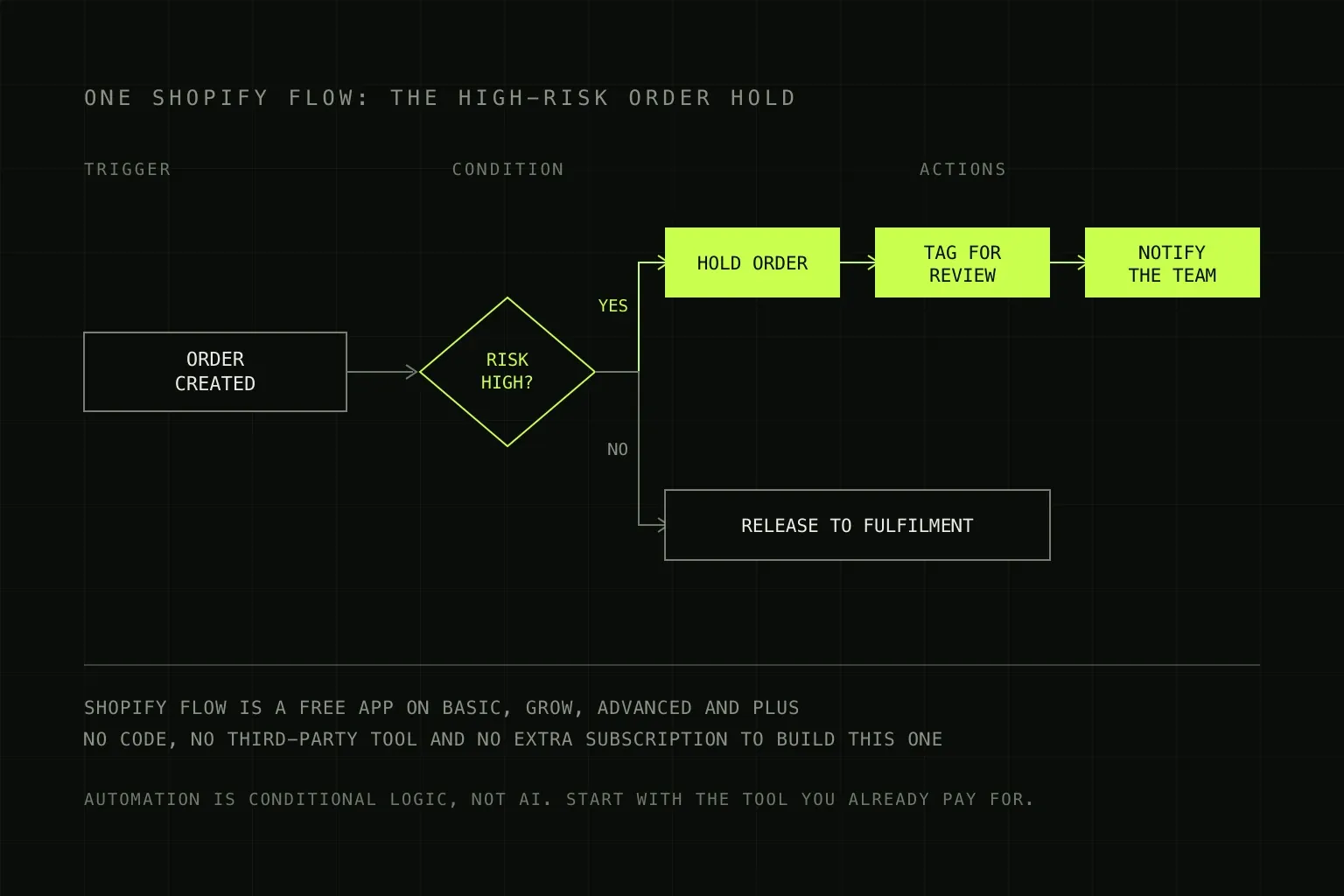
One trigger, one condition, three actions. Most ecommerce automation is this shape.
What ecommerce automation actually is
Strip away the marketing and it is conditional logic attached to events. Something happens in your store, a rule notices, and an action follows without anyone deciding to take it.
Most of it is not AI. An order over £500 from a new customer gets held for review: that is an if-statement, and it has been possible for years. Where AI genuinely adds something is the parts involving unstructured text and judgement, such as reading an incoming customer email and working out whether it is a return request, a delivery query or a complaint. That distinction matters commercially, because AI-labelled automation is priced higher than rule-based automation, and a lot of what gets sold as the former is the latter. What is AI automation covers the difference in more detail.
Start with the tool you are already paying for
Shopify Flow is a free app available on the Basic, Grow, Advanced and Plus plans. If you are on Shopify at all, you have it. This is worth saying plainly because it is not in the interest of anyone selling automation to say it.
Flow covers a genuine amount of ground on its own:
- Tagging customers and orders based on value, frequency, location or product
- Holding or cancelling high-risk orders before they are fulfilled
- Watching inventory levels and raising alerts or restock tasks
- Internal notifications to email or Slack when something needs a human
- Adding or removing customers from segments as their behaviour changes
Two limits to know about before you plan around it. The Send HTTP Requestaction, which is how Flow reaches systems outside Shopify, requires Grow, Advanced or Plus. Custom partner app tasks are Plus only. Usage also follows your plan's API rate limits. On Basic, in other words, Flow is powerful inside Shopify and largely stops at the boundary.
On WooCommerce there is no direct equivalent shipped in the box, so the connector platform is doing more of the work from the start. That is one of the less obvious operational differences covered in Shopify vs WooCommerce.
The eight processes worth automating, by payback
Ranked by how often they run rather than how interesting they are, which is the only ranking that matters. Frequency is what turns a small saving into a real one.
| Process | Trigger | Build it in |
|---|---|---|
| 1. Order to fulfilment | Order paid | Make or n8n. Orders reach your 3PL, fulfilment tool or supplier without re-keying. The highest-frequency task in most stores and the one most often still done by hand. |
| 2. Low stock and oversell prevention | Inventory below threshold | Shopify Flow, free. Alert, auto-hide the product, or raise a reorder. Prevents the two worst outcomes in ecommerce: a stockout and a sale you cannot honour. |
| 3. Support triage | Message received | Make or n8n with an AI step. Categorise, attach the order, route to the right person, draft a first reply. This is where AI genuinely earns its place. |
| 4. High-risk order holds | Order flagged or over a value threshold | Shopify Flow, free. Small effort, and it pays for itself the first time it catches a fraudulent order. |
| 5. Returns and refunds | Return requested | Make or n8n. A consistent path with approval gates, rather than a process that lives in one person's inbox and stops when they are on holiday. |
| 6. Customer tagging and segmentation | Order placed, or time elapsed | Shopify Flow, free. Feeds your email platform so campaigns target behaviour rather than a single undifferentiated list. |
| 7. Review and feedback requests | Order delivered | An app, usually. Well served by cheap off-the-shelf tools. Building this custom is rarely worth it. |
| 8. Sales and stock reporting | Schedule | Make or n8n into a sheet or dashboard. Lower frequency, but it removes a monthly scramble and makes the numbers current rather than remembered. |
Notice that three of the eight are free in Shopify Flow. If nobody has mentioned that to you while quoting for automation, it is worth asking why.
Choosing the tool
| Tool | Cost | Use it when |
|---|---|---|
| Shopify Flow | Free on all plans | The whole automation lives inside Shopify. Always check here first. |
| A Shopify App Store app | Typically £5 to £50 a month | Someone has already built exactly this. Reviews, loyalty, subscriptions, shipping rules. Frequently the correct answer. |
| Make.com | Per-operation billing | Connecting Shopify to several other systems with branching logic. The visual builder suits multi-step ecommerce flows well. |
| n8n | Per-execution, self-hostable | High order volume, where per-step billing gets expensive, or when you want to host it yourself. See n8n vs Make. |
| Zapier | Per-task billing | Simple two-app connections and the widest app library. Gets expensive quickly at ecommerce volumes. Zapier alternatives covers the options. |
Build or buy
Against our own commercial interest, the honest guidance: if an app in the Shopify App Store does the thing, buy the app.
A £20 a month app is maintained by someone else, updated when Shopify changes its API, and supported when it breaks. A custom workflow doing the same job costs several hundred pounds to build and then becomes your responsibility forever. The maths only favours custom when the process is specific to how your business works, when it spans several systems no single app covers, or when the app that exists nearly fits and the gap is the expensive part.
The reverse trap is real too: eleven apps each doing one small thing, each with a subscription, several overlapping, is a common state for a three-year-old store and frequently costs more than a single custom workflow would have.
What it costs
Building it yourself in Shopify Flow costs nothing but an afternoon. Apps are usually £5 to £50 a month. For custom work, a freelancer typically charges £500 to £1,500 per workflow, and a small agency £1,500 to £6,000 for a project covering several connected workflows with documentation and error handling. The automation platform itself is usually £8 to £30 a month at small business volumes. The full breakdown, including what ongoing support should cost, is in the AI automation cost guide.
The number that decides whether any of it is worth it is simpler than the quote: how many times a week does this happen, and how long does it take each time. An hour a day recovered is worth roughly £6,000 a year at modest rates. A task that runs twice a month is almost never worth automating, however irritating it is.
What breaks, and the part nobody plans for
Automation fails differently from software. A broken website is obvious. A broken automation is silent, and by the time you notice, it has been not-happening for three weeks.
- Silent failure. The single most important thing to specify. Every workflow needs to tell a human when it fails, and someone needs to own that alert. Without this you have replaced a manual process with an invisible one.
- API rate limits. Fine at fifty orders a day, not fine during a Black Friday spike. Ask what happens when the limit is hit, and whether the workflow queues or drops.
- Double actions. Refund and fulfilment automations are the dangerous ones, because a retry that is not idempotent can refund a customer twice. Any workflow that moves money needs a guard against running twice on the same order.
- Someone renames a tag. Automations built on tags or product naming conventions break when a person changes one, for good reasons, without knowing a workflow depends on it. Document what is load-bearing.
- Platform changes. Shopify, your helpdesk and your accounting system all update their APIs. Something will need adjusting once or twice a year.
The clause that matters more than the price
If you hire someone to build this, insist on one thing: every account is in your company's name, with your billing, and the person building it is a collaborator you can remove. The Shopify store, the Make or n8n workspace, the API keys, all of it.
Automations built inside an agency's own workspace are an invisible dependency. It works fine right up until you want to change agency, and then you discover the workflows are not yours. Ask before the work starts, because it is a simple request beforehand and an awkward one afterwards. How to hire an AI automation expert covers the rest of the contract terms worth getting right.
Where we sit
We build Make.com automations for Shopify stores: order and fulfilment sync, inventory alerting, support triage, returns, and reporting. Every scenario ships with error monitoring and plain-English documentation, and we include thirty days of monitoring after deployment.
We also tell people to use Shopify Flow when Shopify Flow does the job, and to buy the app when the app exists, because a store paying us for something free is a client who works out later that they were paying us for something free.
Scope and process on the ecommerce automation service page. If you are still choosing a store platform, start with what a Shopify store costs and the ecommerce website cost guide. And if you sell on marketplaces alongside your own store, our marketplace seller support hub covers suspensions, appeals, and payout holds, which is the one part of ecommerce operations you cannot automate your way out of.
Frequently asked questions
What is ecommerce automation?
Rules that run themselves when something happens in your store. An order comes in and gets routed to your fulfilment partner. Stock drops below a threshold and someone gets alerted. A support email arrives and gets categorised and assigned. It is mostly ordinary conditional logic rather than AI, though AI is genuinely useful for the parts involving unstructured text, such as reading an incoming email and deciding what it is about.
Is Shopify Flow free?
Yes. Shopify Flow is a free app available on the Basic, Grow, Advanced and Plus plans, so almost every Shopify merchant already has it. Some capabilities are gated: the Send HTTP Request action, which is how Flow talks to systems outside Shopify, requires Grow or above, and custom partner app tasks are Plus only. Usage limits also follow your plan's API rate limits. For internal store logic on any plan, it costs nothing.
What should I automate first in my Shopify store?
Whatever someone currently does every single day. In most stores that is one of three things: routing orders to fulfilment, catching low stock before it becomes an oversell, and triaging incoming customer messages. Resist starting with the interesting automation. Start with the boring, high-frequency one, because payback is a function of how often it runs, not how clever it is.
Do I need Zapier, Make or n8n if I already have Shopify Flow?
Only when the automation has to leave Shopify. Flow is excellent at logic inside your store: tags, order holds, inventory conditions, internal notifications. It is limited when you need to reach an accounting system, a 3PL, a helpdesk or a spreadsheet, which is where Make, n8n or Zapier earn their subscription. A good rule is to build everything you can in Flow first, then add a connector platform for the specific hops it cannot make.
How much does ecommerce automation cost?
If you build it yourself in Shopify Flow, nothing beyond your time. An off-the-shelf app from the Shopify App Store typically runs £5 to £50 a month and is frequently the cheapest answer. Custom work built by an agency generally runs £500 to £1,500 per workflow with a freelancer and £1,500 to £6,000 for a small agency project covering several connected workflows, plus £8 to £30 a month for the automation platform itself. Our AI automation cost guide breaks this down properly.
Can automation replace my customer service team?
No, and stores that try tend to reverse it within a quarter. What automation reliably does is remove the sorting: categorising incoming messages, pulling the order details into the ticket, drafting a first response for the handful of questions that make up most of the volume, and escalating anything unusual. That typically gives a support person back a large part of their day. The judgement calls, and the annoyed customers, still need a human.